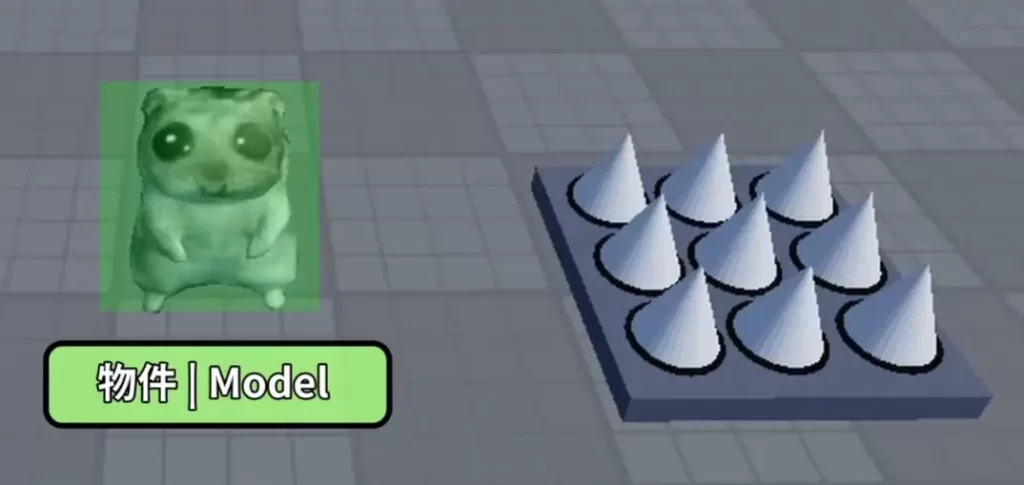
Imagine your character—a sneaky mouse—stepping onto a trap in your Roblox experience. Suddenly, it flattens into a pile of pixels! Behind this fun mechanic? Roblox Objects (also known as Instances). Everything you see and interact with in Roblox—from parts and models to lights and scripts—is an Object. Mastering them is key to rapid game development, as they provide built-in Properties (data like position or health), Methods (actions like destroy or clone), and Events (triggers like “touched”).
This beginner-friendly guide breaks it down, with hands-on tips from the official Roblox API. By the end, you’ll navigate the Explorer, create hierarchies, and build mechanics like that deadly trap—all updated for late 2026.
What Are Roblox Objects?
In Roblox, Objects form the backbone of your experience. The Object class is the ultimate base—every class inherits its core features like ClassName and Changed event. Instance is the next layer, the root for all insertable game objects (Parts, Models, Scripts) in the DataModel tree (your game).
Analogy: Like an iPhone—base model (Object) gives essentials (screen, battery), upgrades (Instance) add camera/phone, and apps (specific classes like Part) specialize.
| Component | Description | Example |
|---|---|---|
| Properties | Editable data values. | Health (number on Humanoid), Position (Vector3 on Part). |
| Methods | Functions you call on the object. | Destroy(), Clone(). |
| Events | Signals that fire on changes/actions. | Touched (fires when something bumps it). |
These let you build complex features quickly without reinventing physics or detection.
Real-World Example: The Trap Mechanic
Your mouse (a Model of Parts + Humanoid) touches a trap (Part):
- Trap’s Touched event fires, passing the touching part.
- Use Parent property to climb the hierarchy: touching Part → Model → Humanoid.
- Call Humanoid’s
TakeDamage()method to reduceHealthproperty to 0.
Sample Script (insert as ServerScript in trap Part):
local trap = script.Parent  -- The Part object
local function onTouched(hit)
    local humanoid = hit.Parent:FindFirstChild("Humanoid")
    if humanoid then
        humanoid.Health = 0  -- Or humanoid:TakeDamage(100)
    end
end
trap.Touched:Connect(onTouched)
Test: Play your experience—boom, mouse squished!
Exploring Objects in Roblox Studio
Open Explorer (View > Explorer, dock left): Your hierarchical object tree. Top-level Services (Workspace, Players, Lighting) are Objects too—expand with arrows (→/← keys).
- Right-click any Object > Help: Opens the API Reference (create.roblox.com/docs/reference/engine/classes/[ClassName]). Details properties/methods/events with code samples. Toggle to English for accuracy (AI translation improving but imperfect).
- Hover + Insert (⊕ or Ctrl+I): Create Objects under any parent. Common: Part, Folder. (Fallback if Home tab lacks it.)
Search Explorer: “is:Part” or “workspace.Model” for quick finds.
Inheritance: Superpowers from Base Classes
All Objects inherit from Object and Instance:
- Object:
IsA(),GetPropertyChangedSignal()(efficient property watching),Changedevent. - Instance:
Parent,Clone(),Destroy(), child finders (FindFirstChild()), events likeChildAdded.
A Part gets Part-specifics (Size, Material) plus Instance’s hierarchy tools.
Object Hierarchy: Parent & Child Relationships
Think folders/files: Parent owns Children. Key Instance property: Parent (read/write).
| Relationship | Code Example | Effect |
|---|---|---|
| Set Child | part.Parent = workspace | Adds to Workspace (visible). |
| Find Child | model:FindFirstChild("Humanoid") | Gets first matching child. |
| All Descendants | workspace:GetDescendants() | Array of everything under. |
| Destroy Tree | model:Destroy() | Nils Parents recursively. |
Drag in Explorer to reparent. Events: ChildAdded(child), AncestryChanged() track changes.
Pro Tip: Set properties before Parent to avoid replication lag.
Roblox Assistant: AI for Object Discovery (2026)
Studio’s Assistant (Mezzanine bar > Assistant) helps beginners:
- Ask: “What Objects for a trap that damages players?” → Lists Part.Touched, Humanoid.Health.
- 2026: Enhanced generation—
/generate a trap modelcreates refined 3D assets; deeper code explanations.
Caution: Use for learning (e.g., “Explain Parent property”), not full scripts yet. Build debugging basics first—AI code needs tweaks.
Quick Review & Next Steps
- All = Objects/Instances (inherit Object/Instance).
- Power trio: Properties/Methods/Events.
- Explorer: Right-click Help, ⊕ Insert.
- Inheritance unlocks shared features.
- Hierarchy via Parent/Child.
Practice: Create a trap in a new Baseplate. Check API for Humanoid: create.roblox.com/docs/reference/engine/classes/Humanoid.
Next: Common Objects/Properties tutorials. Dive into Studio—your epic game starts here! Questions? DevForum or Assistant await.